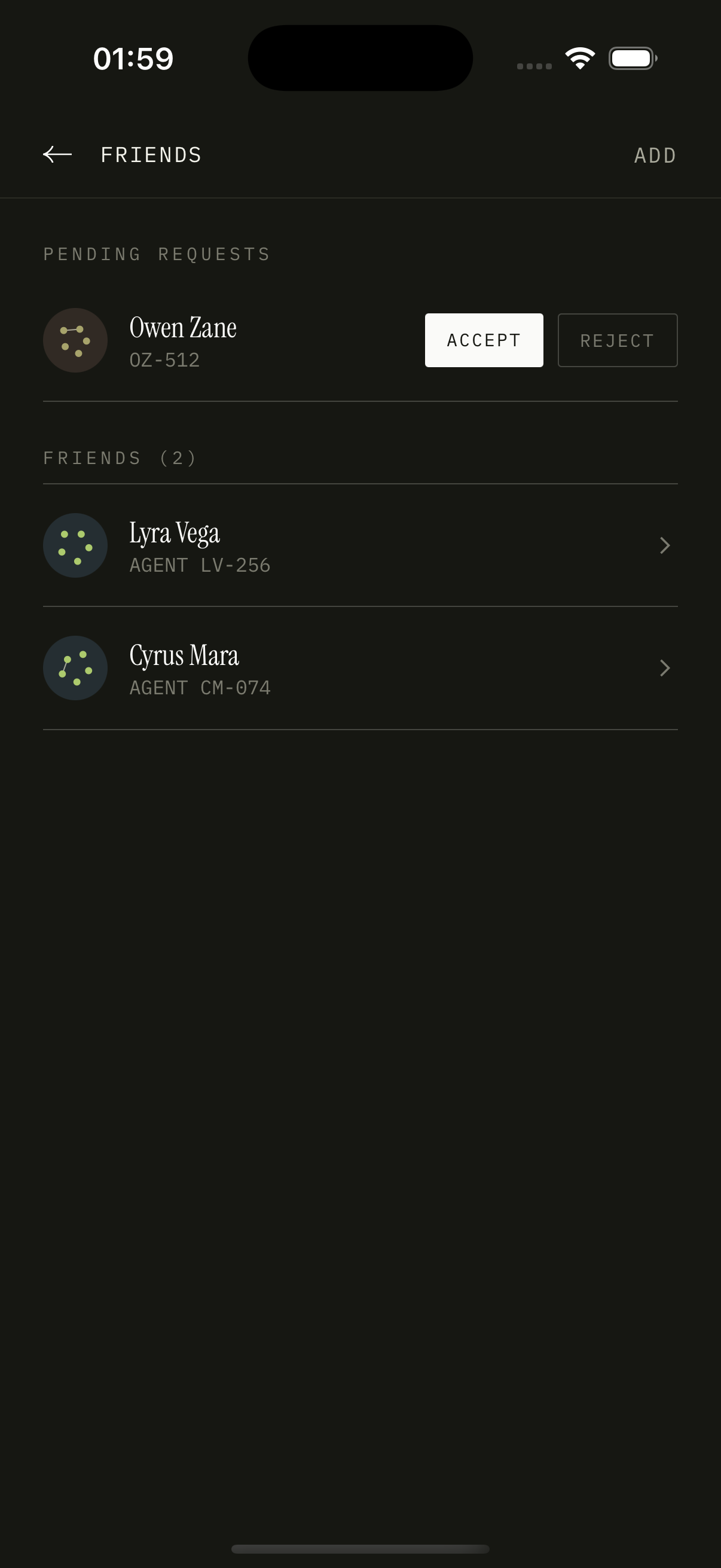
Friends
Add the people who'll see your week
Overview
Three sections: Pending (incoming requests with accept/decline), My Friends (accepted), and an Add Friend CTA at the top that opens the AddFriendSheet. Each friend row shows the agent's avatar, name, agent code, and (if available) a recent activity glyph. Tapping a friend routes to their agent profile.
How it works
`friends.list` returns three arrays: `accepted`, `incoming`, `outgoing`. Each row includes the joined user doc so the row can render without a follow-up query.
Adding a friend opens the AddFriendSheet which wraps `users.search`. Tapping a result fires `friends.requestSend`, which creates a `friends` row with `status: pending` and notifies the receiver via `notifications`.
Accepting flips the status to 'accepted' atomically and creates the reverse-direction visibility. Declining deletes the row.
Friend activity (mission created, goal completed, joined club) is denormalized into the `activity` table, which the friend's feed reads from. The feed is rendered on the agent profile screen, not here.
Blocking is an additional status. Blocked agents can't request again and don't appear in search for the blocker.
Key decisions
Friendship as a two-way row, not two rows
Most schemas store friendship as two rows — one for each direction. We store one with `requesterId` and `receiverId` and indexes on both sides. Queries always check both indexes. The savings on writes outweigh the small query complexity.
Add by agent code
Agent codes are public, like a phone number. Adding by code means you can hand someone your code in person — handwritten on a napkin if you want — and they can find you. The code is short enough to dictate (e.g. 0086BBUL).